In one case, we need a wait bar to know how much process that run. We can make a wait bar to indicate process. In Matlab we use WAITBAR instruction that have syntax above:
H = WAITBAR(X,'title', property, value, property, value, ...)
creates and displays a waitbar of fractional length X. The handle to the waitbar figure is returned in H. X should be between 0 and 1. Optional arguments property and value allow to set corresponding waitbar figure properties. Property can also be an action keyword 'CreateCancelBtn', in which case a cancel button will be added to the figure, and the passed value string will be executed upon clicking on the cancel button or the close figure button (taken from MATLAB HELP)
Example :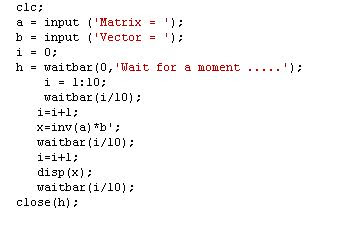

 From that method we can arrange an algorithm :


